Dry breath-hold training · Free
Eyes shut, phone away.
Your wrist does
the counting.
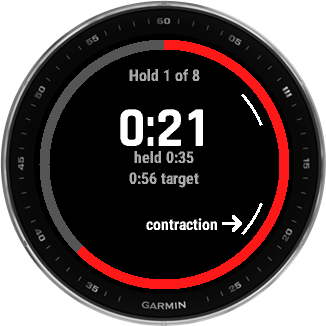
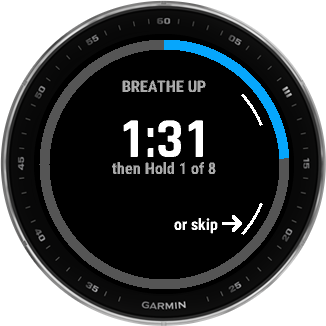
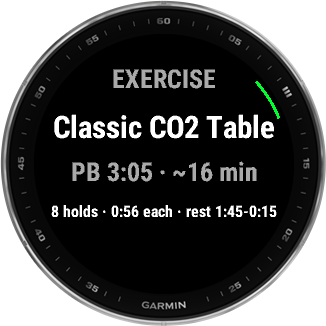
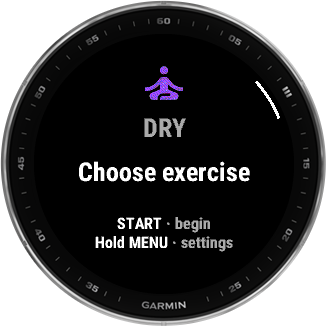
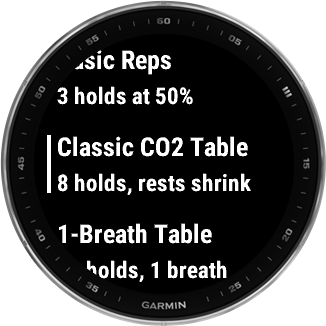
inDepth Apnea Dry runs your breath-hold tables on your Garmin, on the couch or the floor at home. It times every breathe-up, hold and rest, buzzes you through each change so you never have to look, and logs your first contraction with one press. Max statics, CO2 tables and one-breath tables are built in, and every hold scales from your own personal best.
Built for dry apnea
Your phone is the wrong tool for a CO2 table.
Dry training happens lying down with your eyes closed. The thing doing the counting should be on your wrist and quietly buzzing, not lit up on the carpet next to you. So that’s where inDepth Dry lives.
Buzzes, never beeps
Three short buzzes before a phase ends and a double buzz on the change. Train with your eyes closed, late at night, without waking anyone up.
02Scaled to your max
Do one Max Static, or type in the number you already know. Every table after that is worked out from it, so the holds fit you and not someone else.
03Stops when you should
Feel light-headed or panicky? Say so from the menu and the session ends right there. The watch then holds off on the next one until you tell it you’re OK.
On the watch Works out of the box
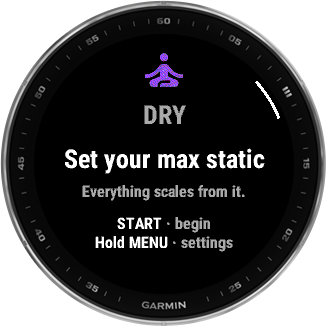
Set your max once. Everything else scales from it.
Safety
You can black out on dry land, too.
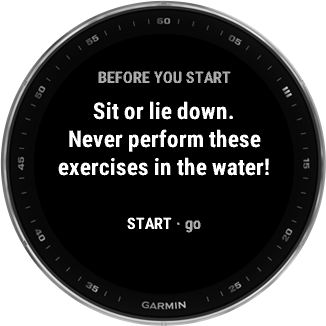
Before your first session the watch shows one short card: sit or lie down, and never do these exercises in the water. If you stop a hold because you felt light-headed or panicked, the whole session ends and the watch won’t start another until you answer one question on it. Nothing gets erased, and your history still syncs. And please: never train alone.
On your phone inDepth Apnea Sync
Your dry sessions, next to your wet ones.
inDepth Apnea Sync pulls your dry sessions off the watch over Bluetooth, holds, contractions and heart rate included. It also has a bigger exercise library you can run straight from the phone when your watch is charging.
Built by a freediver, for freedivers
inDepth started on a dive line.

I built inDepth Blue because my Fenix and Descent kept letting me down. I wanted to know when it was safe to dive again. I wanted better alarms, hang detection and a proper history on the watch. Pretty much every feature in the app started as something my own watch couldn't do.
That hasn't changed. I test every release on my own dives, and the device table gets updated whenever divers tell me how their watch behaves in the water.
Mariusz, founder & freediver
- Free, no accountAll three watch apps and the phone app are free. Your logbook stays yours.
- Measured, not assumedOur depth figures come from real logged dives and pressure-chamber runs. Here’s the evidence for each one.
- Shaped by diversWhen a diver tells us how their watch behaves in the water, the device table changes.
Supported hardware
Works on the Fenix or Descent you already own.
You don't need new gear. inDepth runs on nineteen Garmin models today: the Fēnix 5, 5 Plus, 7 and 8 families plus the Descent Mk2, Mk3 and G2, with more coming. How deep it can read depends on the watch. The Fēnix 5, 5 Plus and 8 families read true depth (uncapped, and checked in the water to 30 m). On the Fēnix 7 and the Descent Mk2 and Mk3, Garmin's firmware limits what third-party apps can read. Nobody has tested a Descent G2 yet, so we don't quote a figure for it and the app plays it safe. Each row below tells you which group a watch is in.
| Watch | inDepth Blue | inDepth Pool | inDepth Dry |
|---|---|---|---|
| Fēnix 5 | ✓True depth | — | — |
| Fēnix 5S | ✓True depth | — | — |
| Fēnix 5X | ✓True depth | — | — |
| Fēnix 5 Plus | ✓True depth | ✓ | ✓ |
| Fēnix 5S Plus | ✓True depth | ✓ | ✓ |
| Fēnix 5X Plus | ✓True depth | ✓ | ✓ |
| Fēnix 7 | ✓Depth to ~3m | ✓ | ✓ |
| Fēnix 7S | ✓Depth to ~3m | ✓ | ✓ |
| Fēnix 7X | ✓Depth to ~3m | ✓ | ✓ |
| Fēnix 8 43mm | ✓True depth | ✓ | ✓ |
| Fēnix 8 47mm | ✓True depth | ✓ | ✓ |
| Fēnix 8 Pro 47mm | ✓True depth | ✓ | ✓ |
| Fēnix 8 Solar 47mm | ✓True depth | ✓ | ✓ |
| Fēnix 8 Solar 51mm | ✓True depth | ✓ | ✓ |
| Descent Mk2 / Mk2i | ✓Depth to ~3m | ✓ | ✓ |
| Descent Mk2 S | ✓Depth to ~3m | ✓ | ✓ |
| Descent Mk3 43mm | ✓Depth to ~3m | ✓ | ✓ |
| Descent Mk3i 51mm | ✓Depth to ~3m | ✓ | ✓ |
| Descent G2 | ✓Depth unverified | ✓ | ✓ |
True depth = uncapped depth reading on Fēnix 5, 5 Plus and 8 (field-verified to 30 m).Depth to ~3m = firmware-limited on Fēnix 7, Descent Mk2 and Mk3.Depth unverified = the Descent G2, which nobody has tested yet.
~40 m is the practical limit on a Fēnix, since the case is rated 10 ATM. On the seven ~3 m rows (the Fēnix 7 family, the Descent Mk2 and the Descent Mk3) inDepth Blue only offers the surface-rest models that don't need depth: 2× / 3× Dive Time and Manual, with 2× as the default. Adaptive (AIDA), Taravana and Molchanovs need a depth reading they can trust. Fed a ~3 m reading, all three came out at plain 2× anyway, so now the label says what the math was already doing. Your rests don't get any shorter. The evidence isn't the same for all seven rows: the Descent Mk3 is measured, the Fēnix 7 is inferred, and the Descent Mk2 is based on a diver's report that it stops at ~3 m, not on our own instruments. The Descent G2 is the eighth row without a true-depth badge, and it has no figure at all because nobody has tested one. It's a Descent, so we expect the same cap and the app treats it that way, which means the same three rest models are hidden there too. Molchanovs' 60 m / 24-hour rule isn't enforced on any watch, so keeping to that one is up to you. How we know each number. More Garmin watches are planned: tell us which one you use and we'll let you know if it's added.
Ready to get wet? inDepth Pool counts your laps and turns in dynamic apnea, and inDepth Blue is a freediving computer for depth days.
Free
Take a breath. Then hold it.
inDepth Dry is free. The download page has the desktop installer for the watch app, plus the phone app.